

Introduction
Every day, people log in to computers, access company networks, and use online services without giving much thought to how their access is managed. Behind these everyday activities are security processes designed to verify identities, control permissions, and keep track of user activity. One important framework that makes this possible is AAA, which stands for Authentication, Authorization, and Accounting. Understanding AAA is an important first step for anyone learning about networking, cybersecurity, or information technology because it helps explain how organizations protect their systems and manage access to sensitive resources.
What Is AAA?
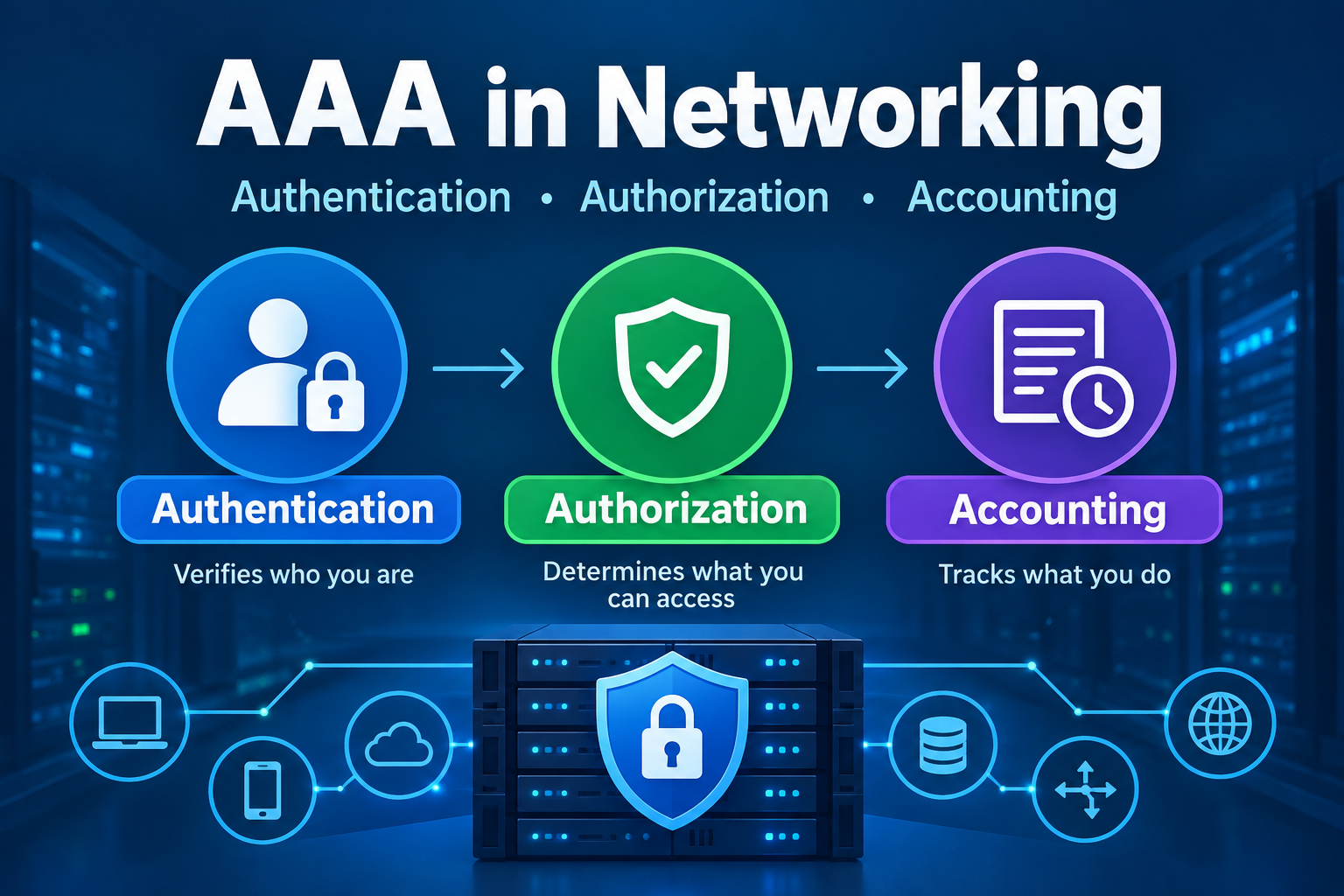
AAA is a security framework used to manage access to computer systems, networks, applications, and other IT resources. It consists of three related functions: Authentication, Authorization, and Accounting.
Although these three functions work together, each serves a different purpose.
Think about entering a secure office building. First, you show your identification badge to prove who you are. Next, the security system determines which areas you are allowed to enter. Finally, the system may record when you entered the building and which restricted areas you accessed.
AAA applies the same general principles to digital environments.
Here is a simple breakdown:
- Authentication: Verifies who you are.
- Authorization: Determines what you are allowed to do.
- Accounting: Records what you do.
Together, these functions help organizations ensure that only legitimate users can access their systems, that users receive appropriate permissions, and that their activities can be reviewed when necessary.
1. Authentication: Verifying Who You Are
Authentication is the first component of AAA. Its purpose is to confirm that a person, device, or service is who or what it claims to be.
When you sign in to a computer, enter your password on a website, or connect to a company network, you are participating in an authentication process.
How Authentication Works
Authentication typically requires a user to provide one or more forms of identification, often called authentication factors.
Common authentication factors include:
- Something you know: A password, PIN, or passphrase.
- Something you have: A smartphone, security key, or hardware authentication token.
- Something you are: A biometric characteristic, such as a fingerprint or facial recognition pattern.
A system compares the information provided with the information associated with the claimed identity. If the credentials are valid, authentication succeeds. If they are invalid, access may be denied.
For example, when you enter your username and password to access your company’s email system, the system checks whether the credentials match the account. If your organization also requires a verification code from an authenticator app, you must complete that additional step.
This is an example of multifactor authentication (MFA) because it combines different types of authentication factors.
Real-World Authentication Example
Imagine that an employee named Sarah needs to connect to her company’s virtual private network (VPN) while working from home.
She enters her username and password and approves a sign-in request using an authentication app on her smartphone. The VPN’s authentication system verifies her credentials and the additional authentication factor.
If the verification succeeds, Sarah’s identity is established for the purpose of the connection.
If someone attempts to connect using an incorrect password and cannot complete the required verification, the system can reject the attempt.
Authentication helps prevent unauthorized individuals from gaining access simply by attempting to connect to a protected resource.
2. Authorization: Determining What You Can Access
Once a system verifies a user’s identity, the next question is: What is that user allowed to do?
This is where authorization comes into play.
Authorization determines which resources a user can access and which actions they can perform. These permissions may depend on the user’s job responsibilities, assigned role, security clearance, or other organizational policies.
Authentication and authorization are closely related, but they are not the same thing. Successfully logging in does not automatically grant someone permission to access everything within a system.
How Authorization Works
Organizations establish rules that determine which users can access specific resources.
For example, a company might assign permissions based on job roles:
- Employees: Can access standard business applications and their own work files.
- IT support technicians: Can troubleshoot computers and manage approved support tools.
- Network administrators: Can configure network equipment and manage network security settings.
- Human resources staff: Can access employee records and HR applications.
- System administrators: Can perform approved administrative tasks on servers and other systems.
These permissions help ensure that users receive only the access they need to perform their jobs.
One common security principle behind this approach is the principle of least privilege. It means giving users only the permissions necessary to complete their assigned responsibilities, rather than granting broad access by default.
Real-World Authorization Example
Consider a hospital with an electronic health record system.
A receptionist may be allowed to view appointment schedules and update patient contact information. A nurse may be permitted to access clinical information needed for patient care. A physician may have additional permissions to review medical histories and document diagnoses.
All three individuals may successfully authenticate to the hospital’s system. However, their permissions differ because their job responsibilities differ.
Authorization helps prevent users from viewing or modifying information they do not need to access.
If the receptionist attempts to open a restricted clinical record, the system can deny the request even though the receptionist has logged in successfully.
3. Accounting: Tracking User Activity
The third component of AAA is Accounting. In this context, accounting does not necessarily mean financial accounting or billing.
Instead, accounting records information about a user’s access and activities within a system or network.
These records help organizations understand what happened, when it happened, and which account or session was involved.
How Accounting Works
Depending on the system, accounting records may include:
- The username or account associated with an activity.
- The date and time a user connected.
- The duration of a network session.
- The device or network equipment involved.
- The amount of data transmitted or received.
- Administrative commands executed on network equipment.
- Whether a session ended normally or unexpectedly.
The information collected depends on the technology and how the organization configures its logging and accounting policies.
Accounting records can help IT teams investigate security incidents, troubleshoot problems, review administrator activity, and demonstrate compliance with organizational or regulatory requirements.
Real-World Accounting Example
Suppose a network administrator changes the configuration of a company’s firewall. Shortly afterward, employees begin experiencing connectivity problems.
The IT security team investigates the incident and reviews the available accounting records and system logs. These records may show which administrator account accessed the firewall, when the session occurred, and which commands were recorded.
The team can use this information to narrow down the cause of the problem and determine whether the change was authorized.
Without reliable records, investigating the incident could be much more difficult.
It is important to remember that accounting does not automatically prevent malicious activity. Instead, it provides evidence that can help organizations detect, investigate, and respond to problems.
How Do Authentication, Authorization, and Accounting Work Together?
AAA is most effective when its three components work together as part of an access management process.
Consider an employee connecting to a company’s internal network.
- Authentication: The employee provides the required credentials, and the system verifies the employee’s identity.
- Authorization: The system determines which network resources and services the employee is permitted to access.
- Accounting: The system records relevant session details and other supported activity information.
These steps help create a controlled process for granting and monitoring access.
For example, if an employee enters an incorrect password, authentication may fail before network access is granted. If authentication succeeds but the employee lacks permission to access a restricted server, authorization can deny that request. If access is permitted, accounting records may capture details about the session.
Although this is a useful way to understand AAA, the three functions do not always occur as three strictly separate steps. Their implementation depends on the system, and accounting records may be generated throughout a session.
What Is an AAA Server?
In many IT environments, AAA functions are managed centrally by an AAA server or service. Instead of configuring every network device to manage every user account independently, an organization can use a central system to process authentication requests and apply access policies.
For example, a company may have hundreds of wireless access points, switches, routers, and VPN connections. Managing separate user accounts and permissions on every device would be difficult and time-consuming.
A centralized AAA service allows supported devices to send access requests to a shared service, which evaluates the request according to configured rules.
This approach can simplify administration, improve consistency, and make it easier to revoke access when an employee leaves the organization.
Two important protocols used in AAA environments are RADIUS and TACACS+.
RADIUS
RADIUS (Remote Authentication Dial-In User Service) is a protocol commonly used to provide centralized authentication, authorization, and accounting for network access.
It is widely used for enterprise Wi-Fi, VPN access, and other network access scenarios.
For example, when an employee connects to a company’s protected wireless network, the wireless infrastructure may communicate with a RADIUS server to help verify the employee’s credentials and determine whether access should be granted.
RADIUS traditionally combines authentication and authorization information in an Access-Accept or Access-Reject response, with additional attributes used to convey access policies. It also supports accounting messages that report session activity.
TACACS+
TACACS+ (Terminal Access Controller Access-Control System Plus) is another protocol used for centralized access control, particularly for administering routers, switches, firewalls, and other network devices.
One important distinction is that TACACS+ separates authentication, authorization, and accounting functions more distinctly at the protocol level. This can be useful when organizations need detailed control over administrative access.
For example, a network engineer might be allowed to view a router’s configuration but not change it. Another administrator may be authorized to execute configuration commands. A TACACS+ deployment can support policies that control which administrative commands users are permitted to execute, depending on the network equipment and configuration.
Both protocols are valuable tools, but the best choice depends on the organization’s requirements and the capabilities of its network devices.
Why Does AAA Matter in IT Security?
AAA is important because organizations need more than a login screen to protect their IT environments. They need ways to verify identities, limit permissions, and maintain records of access.
Here are several reasons AAA matters.
1. Improves Access Security
Authentication helps prevent unauthorized users from accessing protected systems. When combined with strong passwords, multifactor authentication, and appropriate account policies, it can significantly strengthen access security.
2. Limits Unnecessary Permissions
Authorization helps ensure that users cannot automatically access every system or data source simply because they have a valid account. This reduces the risk of accidental changes, unauthorized data access, and misuse of privileges.
3. Supports Security Investigations
Accounting provides records that help security teams investigate suspicious activity, understand system changes, and reconstruct events when sufficient logging is available.
4. Simplifies User Management
Centralized AAA can make it easier for IT teams to manage accounts and access policies across many devices. When a user’s responsibilities change or employment ends, administrators can update or revoke access through the appropriate centralized systems.
5. Helps Organizations Meet Compliance Requirements
Some organizations must demonstrate that access to sensitive systems and information is controlled and monitored. AAA-related controls and records can support these efforts, although the exact requirements depend on the applicable regulations, standards, and organizational policies.
Common Challenges and Best Practices
Although AAA provides important security benefits, it must be implemented and maintained properly.
Organizations should follow several best practices:
- Use multifactor authentication where appropriate. Add stronger verification for remote access, privileged accounts, and other high-risk situations.
- Apply the principle of least privilege. Give users only the permissions they need and review those permissions regularly.
- Protect AAA communications. Use secure configurations and appropriate network protections. For example, RADIUS deployments should consider the limitations of traditional RADIUS over UDP and use supported protections such as RADIUS over TLS or protected network paths where appropriate.
- Monitor and protect accounting records. Restrict access to logs, protect their integrity, and retain them according to organizational policies.
- Maintain reliable backups and recovery procedures. Centralized AAA failures can affect many users, so organizations should plan for service outages and provide appropriate redundancy.
- Review accounts and access policies regularly. Remove unnecessary accounts and revoke permissions when they are no longer required.
Centralized AAA is especially powerful, but it can also become a critical dependency. If an AAA service becomes unavailable, systems that depend on it may be unable to authenticate users. Proper redundancy and carefully designed fallback policies help reduce this risk.
Key Terms to Know
The following terms will help beginners understand AAA and how it fits into networking and cybersecurity.
- AAA: Authentication, Authorization, and Accounting; a framework for managing and monitoring access.
- Authentication: The process of verifying the identity of a user, device, or service.
- Authorization: The process of determining which resources or actions an authenticated identity is permitted to access.
- Accounting: The collection of records about access sessions and supported user activities.
- Credentials: Information used to establish identity, such as passwords, security keys, or certificates.
- Multifactor Authentication (MFA): An authentication method that requires two or more different types of authentication factors.
- Least Privilege: A security principle that limits permissions to what is necessary for a user’s responsibilities.
- AAA Server: A centralized service that helps manage authentication, authorization, and accounting.
- RADIUS: A protocol commonly used for centralized network access authentication, authorization, and accounting.
- TACACS+: A protocol frequently used to manage administrative access to network devices.
- Access Control: The policies and mechanisms used to determine who or what can access a resource.
- Audit Log: A record of relevant events used to review activity, investigate incidents, and support accountability.
Conclusion
AAA is a fundamental concept in networking and cybersecurity because it helps organizations control who can access their systems, what they can do, and how their activities are recorded. Authentication verifies identity, authorization determines permissions, and accounting creates records that can support monitoring and investigations. Together, these functions provide a structured approach to managing access across networks, applications, and IT infrastructure. Whether you are studying for an entry-level IT certification, learning network administration, or exploring cybersecurity as a career, understanding AAA will give you a solid foundation for learning how modern organizations protect their digital resources.





Comments (0)