

Cybersecurity professionals use many different technologies to protect networks from attacks, unauthorized access, and malicious activity. Two of the most important technologies are Intrusion Detection Systems (IDS) and Intrusion Prevention Systems (IPS).
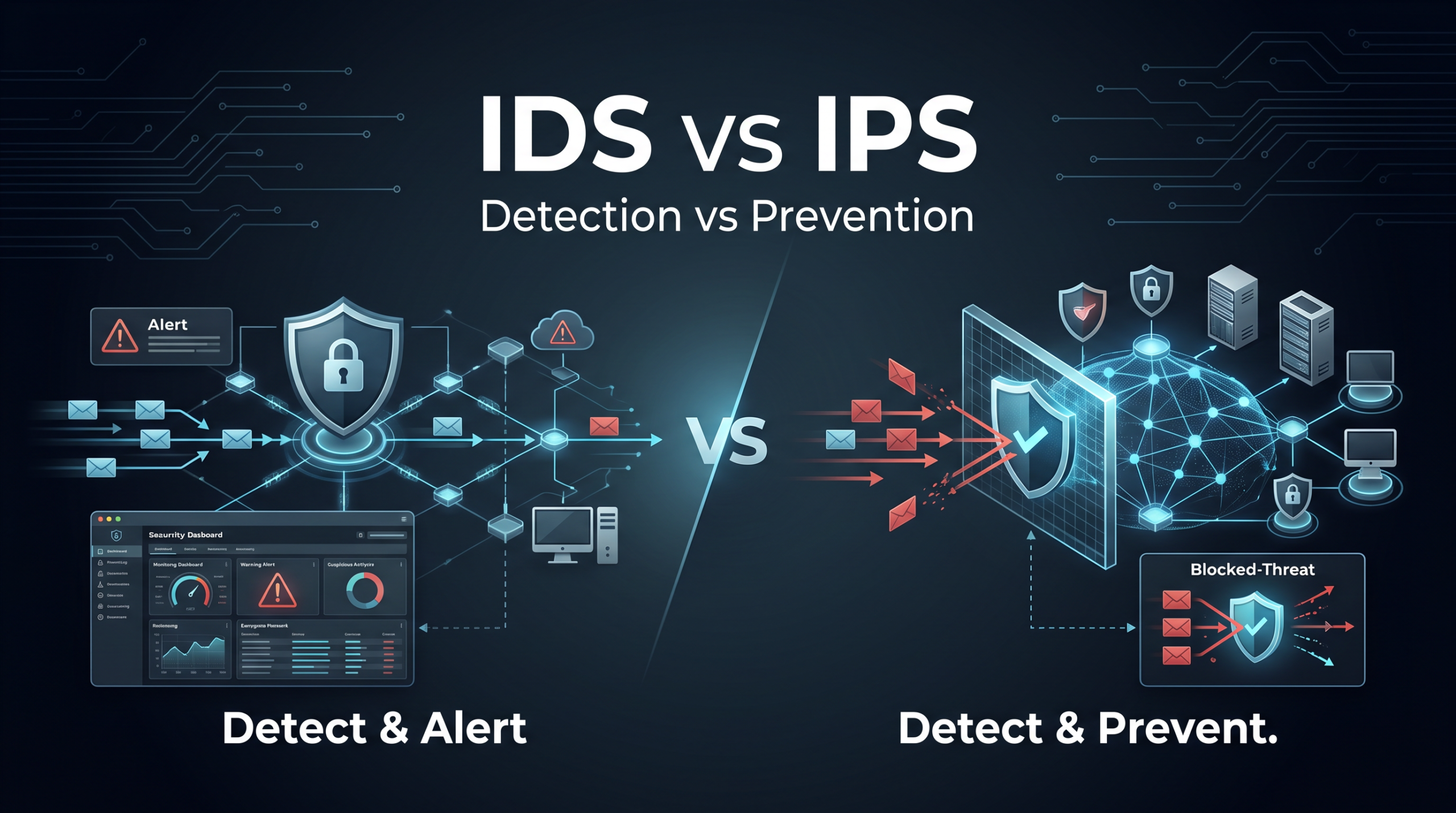
Although IDS and IPS perform similar functions and are often discussed together, they have a fundamental difference: an IDS detects and alerts, while an IPS can detect and take action to stop threats.
Understanding the difference between these technologies is important for anyone learning networking, cybersecurity, or information technology. It is also a common topic for networking and cybersecurity certifications.
In this guide, we’ll explain what IDS and IPS are, how they work, how they differ, where they are deployed, and when an organization might use one or both.
What Is an Intrusion Detection System (IDS)?
An Intrusion Detection System (IDS) is a security technology designed to monitor network traffic or system activity for signs of malicious or suspicious behavior.
When an IDS identifies potentially malicious activity, it generates an alert that can be reviewed by a network or security administrator.
The key characteristic of an IDS is that it is primarily a detection and alerting system. It generally does not automatically block the traffic that triggered the alert.
How an IDS Works
An IDS continuously monitors activity and analyzes it for patterns that could indicate an attack or policy violation.
A simplified IDS process looks like this:
Network or system activity → IDS analyzes activity → Threat detected → Alert generated → Security team investigates
For example, suppose an attacker attempts to scan hundreds of network ports on a server.
The IDS may recognize the unusual scanning behavior and generate an alert such as:
Possible port scanning activity detected.
The security team can then investigate the source of the traffic and determine whether additional action is necessary.
What Can an IDS Detect?
An IDS can potentially detect activities such as:
- Port scanning
- Brute-force login attempts
- Malware activity
- Denial-of-service attacks
- Suspicious network traffic
- Exploitation attempts
- Unauthorized access attempts
- Policy violations
- Unusual traffic patterns
However, detection capabilities depend on the IDS technology, configuration, signatures, and monitoring environment.
What Is an Intrusion Prevention System (IPS)?
An Intrusion Prevention System (IPS) is a security technology that monitors network traffic or system activity for threats and can automatically take action to prevent or limit malicious activity.
Like an IDS, an IPS analyzes traffic and looks for suspicious patterns. The major difference is what happens after a threat is detected.
An IPS can take actions such as:
- Dropping malicious packets
- Blocking traffic from an IP address
- Resetting network connections
- Blocking specific types of traffic
- Updating security controls
- Quarantining suspicious activity
A simplified IPS process looks like this:
Network traffic → IPS analyzes traffic → Threat detected → IPS takes action → Malicious traffic blocked
This ability to respond automatically makes IPS technology particularly valuable in environments where threats need to be stopped quickly.
IDS vs. IPS: The Key Difference
The easiest way to remember the difference is:
IDS = Detect and alert
IPS = Detect and prevent
An IDS acts primarily as a monitoring system. It identifies potentially malicious activity and notifies security personnel.
An IPS sits inline with network traffic and can actively intervene when it identifies malicious activity.
| Feature | IDS | IPS |
| Full Name | Intrusion Detection System | Intrusion Prevention System |
| Primary Purpose | Detect threats | Detect and prevent threats |
| Generates Alerts | Yes | Yes |
| Automatically Blocks Traffic | Generally no | Yes |
| Typical Deployment | Out-of-band/passive | Inline |
| Can Stop Attacks Automatically | No | Yes |
| Risk of Blocking Legitimate Traffic | Lower | Higher |
| Administrative Response | Usually required | Can be automated |
| Main Focus | Visibility and detection | Detection and prevention |
How IDS and IPS Are Deployed
One of the most important differences between IDS and IPS is where they are placed in relation to network traffic.
IDS: Typically Deployed Passively
An IDS is commonly deployed so that it can observe a copy of network traffic without sitting directly in the traffic path.
For example:
Network traffic
↓
Network switch
↓
Destination
Meanwhile, a copy of the traffic can be sent to the IDS for analysis.
Because the IDS is not necessarily inline, a problem with the IDS does not normally interrupt network traffic.
This makes IDS deployments useful when an organization primarily wants visibility into what is happening on its network.
IPS: Typically Deployed Inline
An IPS is generally deployed inline, meaning network traffic passes through it.
A simplified example looks like this:
Internet
↓
Firewall
↓
IPS
↓
Internal Network
↓
Servers / Clients
Because the IPS sits in the traffic path, it can inspect traffic and take action before malicious traffic reaches its destination.
For example, if the IPS identifies a packet as part of a known attack, it can drop the packet instead of allowing it to continue through the network.
IDS vs. IPS Example
Consider a company with a web server exposed to the internet.
An attacker attempts to exploit a vulnerability in the web server.
With an IDS
The IDS analyzes the traffic and recognizes a suspicious attack pattern.
It generates an alert:
“Possible web application exploit detected from 203.0.113.50.”
The traffic may continue toward the server.
A security administrator can then investigate and determine what action should be taken.
With an IPS
The IPS analyzes the same traffic and identifies the attack.
It can automatically drop the malicious packets.
The attack is therefore stopped before reaching the server.
This illustrates the fundamental difference:
IDS identifies the threat. IPS identifies and responds to the threat.
Types of IDS and IPS
IDS and IPS technologies can be categorized in several ways.
One common classification is based on what they monitor.
Network-Based IDS (NIDS)
A Network Intrusion Detection System (NIDS) monitors network traffic for suspicious or malicious activity.
A NIDS can monitor traffic moving across network segments and look for indicators of attacks.
For example, a company could deploy a NIDS to monitor traffic between its internal network and the internet.
Advantages of NIDS
- Provides visibility into network activity
- Can monitor multiple systems
- Centralizes detection
- Can identify network-based attacks
- Does not need to be installed on every endpoint
Host-Based IDS (HIDS)
A Host-Based Intrusion Detection System (HIDS) runs on an individual computer or server and monitors activity on that host.
It might monitor:
- System logs
- File changes
- User activity
- Running processes
- Configuration changes
- System calls
For example, a HIDS could detect that an important system file was unexpectedly modified.
Network-Based IPS (NIPS)
A Network Intrusion Prevention System (NIPS) monitors network traffic and can actively block malicious traffic.
It is typically deployed inline and can protect multiple systems behind the IPS.
Host-Based IPS (HIPS)
A Host-Based Intrusion Prevention System (HIPS) operates directly on an endpoint or server.
It can monitor activity on the host and potentially prevent unauthorized actions.
For example, a HIPS might prevent an application from making an unauthorized modification to a protected system file.
Signature-Based Detection
Both IDS and IPS technologies can use signatures to identify known threats.
A signature is essentially a pattern associated with known malicious activity.
For example, security researchers may identify a specific pattern associated with a particular attack. That pattern can be added to a security product’s signature database.
When traffic matches the signature, the system can identify it as potentially malicious.
Advantages
Signature-based detection can be highly effective against known threats.
Disadvantages
It can have difficulty identifying completely new attacks for which no signature exists.
This is one reason modern security systems often combine multiple detection techniques.
Anomaly-Based Detection
Another approach is anomaly-based detection.
Instead of looking only for known attack signatures, the system attempts to identify activity that deviates from an established baseline.
For example, imagine a server normally receives approximately 1,000 requests per hour.
Suddenly, it receives 100,000 requests in a short period.
An anomaly-based system may recognize that behavior as unusual and generate an alert or take action.
Advantages
Anomaly detection can help identify previously unknown or unusual threats.
Disadvantages
Unusual does not always mean malicious.
Legitimate changes in network behavior can sometimes trigger alerts, creating false positives.
False Positives and False Negatives
Security professionals need to understand two important concepts when working with IDS and IPS technologies.
False Positive
A false positive occurs when a security system identifies legitimate activity as malicious.
For example, an administrator performs a legitimate vulnerability scan against company servers.
The IDS interprets the scanning activity as an attack and generates an alert.
The activity was legitimate, so the alert was a false positive.
Why False Positives Matter
Too many false positives can overwhelm security teams with alerts.
With an IPS, false positives can be even more concerning because the IPS may automatically block legitimate traffic.
False Negative
A false negative occurs when malicious activity is not detected.
For example, an attacker successfully exploits a vulnerability, but the security system fails to recognize the attack.
This is potentially dangerous because the organization may not realize that an attack occurred.
Security teams therefore try to minimize both false positives and false negatives.
Advantages of IDS
An IDS provides several benefits.
1. Improved Visibility
An IDS can give security teams greater insight into network and system activity.
2. Threat Detection
It can identify suspicious behavior and known attack patterns.
3. Lower Risk of Disruption
Because an IDS generally does not block traffic automatically, it is less likely to interrupt legitimate network activity.
4. Security Investigation
IDS alerts can provide useful information for security analysts investigating incidents.
5. Network Monitoring
An IDS can provide an additional layer of visibility alongside firewalls, endpoint security, and other security technologies.
Advantages of IPS
IPS technology provides several additional benefits.
1. Automatic Prevention
An IPS can automatically block or disrupt detected attacks.
2. Faster Response
Because the system can respond automatically, threats may be stopped without waiting for a security administrator.
3. Reduced Attack Impact
Blocking malicious traffic can prevent an attack from reaching vulnerable systems.
4. Continuous Protection
An IPS can operate continuously and respond to threats around the clock.
Disadvantages of IDS
IDS technology also has limitations.
It Does Not Usually Stop Attacks
The biggest limitation is that detection does not necessarily equal prevention.
An IDS may tell you an attack is occurring, but someone may still need to take action.
Requires Monitoring
Someone needs to review alerts and determine whether they represent real threats.
Alert Overload
Poorly configured IDS systems can generate large numbers of alerts, making it difficult to identify the most important events.
Disadvantages of IPS
IPS technology has its own challenges.
False Positives Can Cause Problems
If an IPS incorrectly identifies legitimate traffic as malicious, it may block valid users or applications.
Can Affect Network Availability
Because an IPS is typically inline, a failure or misconfiguration can potentially affect network traffic.
Requires Careful Configuration
Security teams need to tune IPS policies to balance security and availability.
Performance Considerations
Because traffic needs to be inspected, IPS deployment can introduce processing overhead and potentially affect network performance if improperly sized or configured.
IDS and IPS vs. Firewalls
A common question is:
If a firewall already protects the network, why do we need IDS or IPS?
The answer is that they perform different functions.
A firewall primarily controls network traffic based on security policies and rules.
For example, a firewall might allow HTTPS traffic to a web server while blocking unauthorized inbound connections.
An IDS or IPS provides more specialized analysis of traffic and system behavior.
Consider this simplified example:
Firewall:
“Is this type of traffic allowed?”
IDS:
“Does this traffic look suspicious or malicious?”
IPS:
“Does this traffic look malicious, and should I block it?”
Modern firewalls may incorporate IDS/IPS capabilities, which can blur the distinction between these technologies. However, understanding their traditional roles remains important.
Can IDS and IPS Be Used Together?
Yes. Organizations can use IDS and IPS technologies together as part of a layered security strategy.
For example:
Internet
↓
Firewall
↓
IPS
↓
Internal Network
↓
Servers and Endpoints
A separate IDS could also monitor network segments for additional visibility.
Using multiple security controls can help organizations detect threats that may bypass individual security technologies.
This reflects an important cybersecurity principle:
No single security technology can protect an organization from every threat.
IDS vs. IPS: Which Is Better?
There isn’t a universal answer. The better choice depends on the organization’s security requirements.
An IDS may be appropriate when an organization primarily wants monitoring and detection without automatically interfering with traffic.
An IPS may be more appropriate when the organization needs automated threat prevention.
In many environments, the best approach is to use both detection and prevention capabilities.
For example, an organization might use IPS technology to automatically stop known attacks while using additional monitoring and detection tools to identify suspicious activity that requires investigation.
IDS vs. IPS: A Simple Way to Remember
If you’re studying networking or cybersecurity, remember this simple distinction:
IDS
Detect → Alert → Investigate
IPS
Detect → Block → Prevent
Or even more simply:
IDS tells you about the attack. IPS tries to stop the attack.
IDS vs. IPS: Key Takeaways
IDS and IPS are important components of modern network security.
An Intrusion Detection System (IDS) monitors activity and alerts security personnel when it identifies potentially malicious behavior.
An Intrusion Prevention System (IPS) performs similar detection but can also automatically take action to block or disrupt malicious activity.
The most important differences are:
- IDS primarily detects and alerts.
- IPS detects and can prevent.
- IDS is commonly deployed passively.
- IPS is commonly deployed inline.
- IDS generally requires human intervention to respond.
- IPS can respond automatically.
- IPS can introduce greater risk of disrupting legitimate traffic if incorrectly configured.
- Both technologies can use signature-based and anomaly-based detection.
- IDS and IPS can complement firewalls and other security technologies.
Understanding IDS and IPS provides an important foundation for learning more advanced cybersecurity concepts such as network monitoring, threat detection, security operations, and intrusion prevention.
Frequently Asked Questions
Is an IDS better than an IPS?
Not necessarily. IDS and IPS serve different purposes. IDS focuses on detecting and alerting about threats, while IPS can automatically block malicious activity. Organizations may use both.
Does an IDS block traffic?
Typically, no. An IDS is primarily designed to detect suspicious activity and generate alerts. An IPS is designed to take preventative action.
Does an IPS replace a firewall?
No. Although modern security appliances may combine firewall and IPS capabilities, the technologies traditionally perform different functions.
Is an IPS inline?
Yes. Network-based IPS implementations are typically deployed inline so that they can inspect and potentially block traffic before it reaches its destination.
What is the easiest way to remember IDS vs. IPS?
Remember:
IDS = Intrusion Detection System → Detects and alerts
IPS = Intrusion Prevention System → Detects and prevents
Are IDS and IPS important for networking certifications?
Yes. Understanding IDS and IPS is useful for networking and cybersecurity certification studies because intrusion detection and prevention are fundamental network security concepts.
Conclusion
IDS and IPS are closely related security technologies, but their roles are different.
An IDS provides visibility and detection, helping security teams identify suspicious activity. An IPS goes a step further by providing automated prevention, allowing it to block or disrupt threats.
The simplest distinction is:
IDS detects. IPS prevents.
For organizations building a layered cybersecurity strategy, both capabilities can play an important role alongside firewalls, endpoint security, authentication, logging, and other security controls.





Comments (0)