
If you’ve ever used a computer, smartphone, or tablet, you’ve already interacted with an operating system, even if you didn’t realize it. The operating system, often shortened to OS, is one of the most essential pieces of software that makes modern technology usable. Without it, your device would be little more than a collection of hardware components with no way to communicate or function effectively. For beginners in IT, understanding what an operating system is and what it does is a foundational step toward grasping how computers really work.
A Simple Explanation
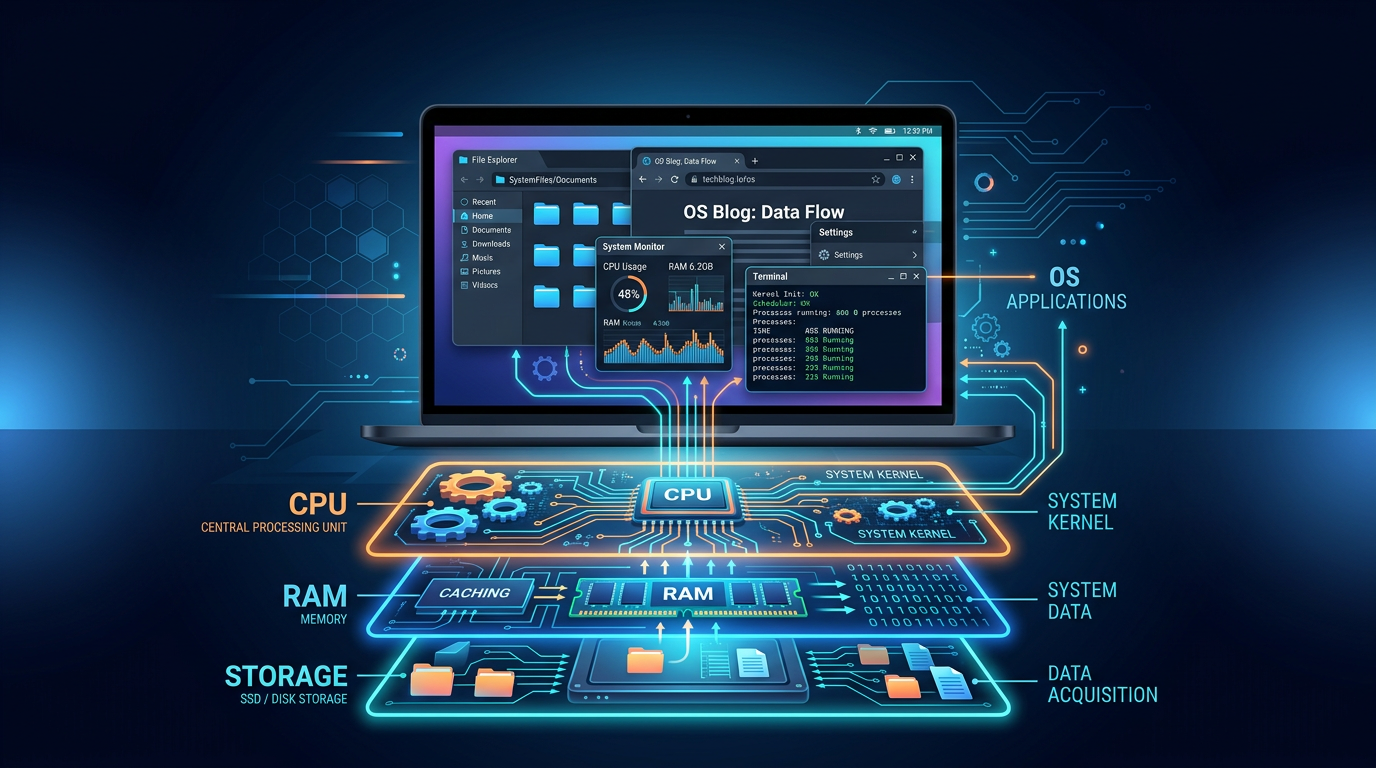
At its core, an operating system is the main software that manages a computer’s hardware and software resources. It acts as a bridge between you (the user), the applications you use (like web browsers or games), and the physical components of your device (like the CPU, memory, and storage).
Think of it like a translator and a manager at the same time. When you click an icon to open an app, the operating system takes that command, processes it, and tells the computer’s hardware exactly what to do. It ensures that everything runs smoothly, efficiently, and without conflict.
Without an operating system, you would need to manually control every piece of hardware using complex instructions, something that would be nearly impossible for most people.
Real-World Examples of Operating Systems
Operating systems are everywhere, and you are likely to use several of them daily without thinking about it. Here are some common examples:
- Windows: One of the most widely used operating systems for personal computers. Known for its user-friendly interface and compatibility with a wide range of software.
- macOS: Apple’s operating system for Mac computers. It’s known for its sleek design and tight integration with other Apple devices.
- Linux: An open-source operating system used by developers, servers, and even some desktops. It’s highly customizable and widely used in IT environments.
- Android: A mobile operating system developed by Google, used on many smartphones and tablets.
- iOS: Apple’s mobile operating system used on iPhones and iPads.
Beyond personal devices, operating systems also power things like ATMs, smart TVs, cars, and even industrial machines. In many cases, these systems are specialized versions of operating systems designed for specific tasks.
What Does an Operating System Actually Do?
To better understand its importance, let’s break down some of the key functions of an operating system:
- Process Management
The OS manages all running programs (called processes). It decides which programs run, when they run, and how much CPU time they get. - Memory Management
It controls how memory (RAM) is used. The OS ensures that each application gets the memory it needs without interfering with others. - File System Management
The OS organizes and stores files on your device. It allows you to create, read, update, and delete files easily. - Device Management
It communicates with hardware like printers, keyboards, and displays using drivers, making sure everything works together. - User Interface
The OS provides a way for users to interact with the computer, whether through a graphical interface (icons, windows) or a command line.
Why Operating Systems Matter
Operating systems are critical because they make technology accessible and usable. Imagine trying to use a computer without one, you would have to write detailed instructions just to open a file or display text on the screen. The OS simplifies all of that into intuitive actions like clicking, tapping, or typing.
Here’s why they matter so much:
- Ease of Use: They provide a user-friendly interface so people don’t need to understand hardware-level programming.
- Efficiency: The OS ensures that system resources are used effectively, preventing slowdowns and crashes.
- Security: Modern operating systems include features like user authentication, encryption, and permissions to protect data.
- Compatibility: They allow different applications and hardware to work together seamlessly.
- Multitasking: You can run multiple applications at once because the OS manages how resources are shared.
For anyone entering IT, understanding operating systems is crucial because nearly every technology you’ll encounter, from servers to smartphones, relies on one.
A Helpful Analogy
A simple way to think about an operating system is to compare it to a restaurant manager:
- The customers are users.
- The orders are the tasks or commands.
- The kitchen staff represents the hardware.
- The manager (OS) ensures everything runs smoothly, taking orders, assigning tasks, and making sure nothing conflicts.
Without the manager, the restaurant would quickly fall into chaos. Similarly, without an operating system, a computer cannot function efficiently.
Key Terms to Know
As you begin learning more about operating systems, you’ll come across important terminology. Here are some key terms to get familiar with:
- Kernel: The core part of the operating system that directly interacts with hardware
- GUI (Graphical User Interface): Visual interface with windows, icons, and buttons
- CLI (Command Line Interface): Text-based interface for interacting with the OS
- Process: A running instance of a program
- Thread: The smallest unit of execution within a process
- RAM (Random Access Memory): Temporary memory used by running programs
- File System: The method the OS uses to organize and store files
- Device Driver: Software that allows the OS to communicate with hardware devices
- Multitasking: Running multiple processes at the same time
- User Permissions: Rules that control access to files and system resources
Final Thoughts
Operating systems are the backbone of every computing device. They quietly handle complex tasks behind the scenes, allowing users to focus on what they want to accomplish, whether that’s browsing the web, editing documents, or running advanced applications. For beginners in IT, gaining a solid understanding of operating systems opens the door to deeper knowledge in areas like networking, cybersecurity, and software development.
As you continue your IT journey, you’ll find that the operating system is not just something you use, it’s something you can learn, configure, and even specialize in. And that’s where things start to get really interesting.




Comments (0)